
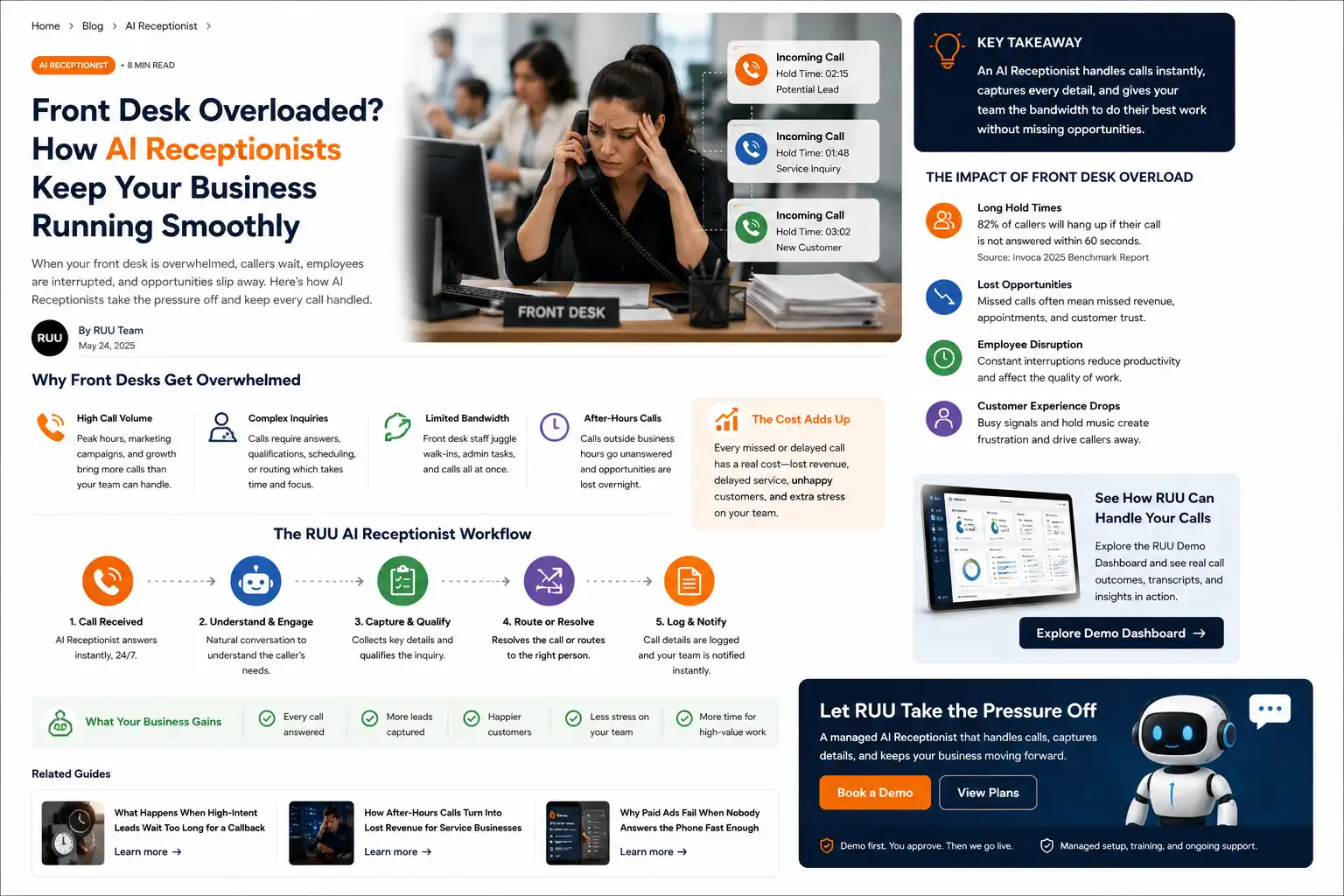
Why front desks overflow
A front desk can be busy even when the team is doing everything right. The person at the desk may be checking someone in, answering a billing question, updating an appointment, helping a walk-in, finding a file, confirming a schedule, and watching the phone light up again.
That is why front desk overflow is rarely a sign of a bad team. It is usually a capacity problem. Calls arrive in bursts. Requests are uneven. Some callers need only a quick answer, while others need careful routing. Staff have to decide which demand gets attention first, and the phone often loses because the person standing in front of them feels more immediate.
For clinics, dental offices, medspas, home-service offices, local service businesses, and appointment-based teams, that pressure can affect both customer experience and revenue visibility. A call that is not answered, not logged, or not followed up can become an appointment that never gets scheduled or a lead that never becomes visible.
Front desk overflow happens when incoming calls, appointment requests, walk-ins, and admin work exceed the team’s real-time capacity. The practical fix is not just “answer faster.” The fix is to capture caller intent, route the right calls, log outcomes, and make next actions visible.
Why overflow costs more than it looks
The cost of overflow is easy to underestimate because the individual moment looks small. A caller waits for a minute. A voicemail gets left. A callback list grows. A staff member writes a partial note. A caller hangs up and tries again later.
But the business impact usually appears later. A new patient chooses another provider. A customer books with a competitor. A reschedule is not confirmed. A caller repeats information multiple times. A manager cannot tell whether the team followed up. The front desk feels busier, but the business still has weak visibility into what was missed.
In patient-facing settings, communication and access matter. Recent patient-experience reporting continues to point to wait times, front desk experience, and communication as reasons people become frustrated with providers. Use that as directional context: the exact impact will vary by market, specialty, staffing, and workflow design.
Where the workflow usually breaks
Front desk overflow creates problems at the handoff points. The caller may reach the business, but the next step is not captured clearly enough to act on. The team may intend to call back, but there is no structured record. A caller may ask for an appointment, but the details needed to schedule or route the request are incomplete.
The workflow usually breaks in a few predictable places:
- The call is missed during a peak period.
- The voicemail is vague or missing key details.
- The caller is placed on hold and hangs up.
- The staff member captures a partial note but not urgency or next action.
- The call should be routed to a person, but the handoff boundary is unclear.
- The manager has no transcript, recording, or outcome to review later.
This is why simply adding another phone line or voicemail box may not solve the problem. The business needs a workflow that turns calls into usable records.
Explore sample call records, transcripts, recordings, routing flags, and next-action cards in the RUU demo dashboard.
What an AI receptionist should capture
An AI receptionist is most useful when it captures repeatable front desk work in a structured way. It should not pretend every call is simple, and it should not remove the need for human judgment. The goal is to give the business more call capacity while making the outcome easier to review.
For many front desk workflows, the useful fields are practical:
- Caller name and phone number
- Reason for calling
- Appointment request, reschedule request, cancellation, or callback need
- Preferred time window or availability
- Urgency level or handoff flag
- Transcript and recording
- Outcome status and next action
- Who should review or follow up
Those fields matter because they turn a phone call into an operational object. Instead of “someone called,” the team sees what happened, what the caller wanted, and what should happen next.
| Call type | Common overflow issue | Useful captured outcome |
|---|---|---|
| New appointment request | Caller waits or leaves an incomplete voicemail. | Name, phone, requested service, preferred time, callback flag. |
| Reschedule or cancellation | Staff must interrupt in-person work to update the schedule. | Requested change, timing, urgency, and next action for the scheduler. |
| General FAQ | Repeat questions consume staff attention during peak periods. | Handled answer plus transcript and escalation option if needed. |
| Urgent or sensitive call | The call needs a human but is not identified quickly. | Handoff flag with caller context and routing note. |
| Callback request | Callback list becomes scattered across notes or memory. | Owner, reason, priority, and follow-up status. |
Human handoff boundaries still matter
AI receptionist workflows should have clear boundaries. In clinic, dental, medspa, or healthcare-adjacent settings, the AI should not diagnose, give medical advice, make clinical judgments, or handle emergency decision-making. Sensitive, urgent, complex, or policy-specific conversations should be routed to a person or the business’s approved process.
That boundary is not a weakness. It is what makes the workflow safer and more useful. AI should absorb repeatable front desk pressure, gather context, and create records. Humans should handle judgment-heavy conversations, sensitive exceptions, and calls that require empathy, discretion, or professional decision-making.
The best front desk workflow is not “AI handles everything.” It is “AI handles what should be structured, and humans receive the calls that need people.”
Where RUU fits
RUU is designed as a managed AI voice system for businesses that need calls handled, logged, followed up, and reviewed. For front desk overflow, RUU can support AI receptionist workflows that answer repeatable calls, capture caller intent, create recordings and transcripts, route handoff needs, and make outcomes visible in the dashboard.
The managed setup matters because many businesses do not want another tool to configure from scratch. They need voice setup, workflow design, business-specific call logic, routing rules, review visibility, and ongoing management. RUU is positioned around that managed layer.
Before anything goes live, the demo-first path lets teams review how sample calls, transcripts, recordings, and outcome cards look. Live AI call handling begins only after plan selection, verification, workflow setup, and production approval.
A simple front desk overflow checklist
Use this checklist to decide whether front desk overflow is a real workflow issue for your business:
- Do calls spike during certain hours, campaigns, or appointment windows?
- Do staff often choose between the person in front of them and the phone?
- Are voicemails missing service type, urgency, or callback context?
- Do managers struggle to review what callers actually asked for?
- Are callbacks tracked in scattered notes, inboxes, or memory?
- Are urgent or sensitive calls clearly routed to humans?
If several of these are true, the problem may not be staff effort. It may be that the call workflow needs more capacity and better visibility.
Sources and research notes
These sources are used as directional context, not as guaranteed outcome claims for RUU. Actual results depend on call volume, staffing, workflow design, market, implementation, and the type of calls being handled.
- Invoca Healthcare Call Conversion Benchmarks Report 2025: useful context that phone calls remain a major access and conversion point for healthcare organizations.
- MGMA patient access strategies for 2025: useful context on appointment wait-time pressure and patient access priorities.
- Tebra patient preferences and habits survey: useful context on how wait times, front desk experience, and communication influence patient experience.
- Dialog Health healthcare call center statistics: useful directional context on hold times and call center access pressure; treat vendor-collected benchmarks carefully.