
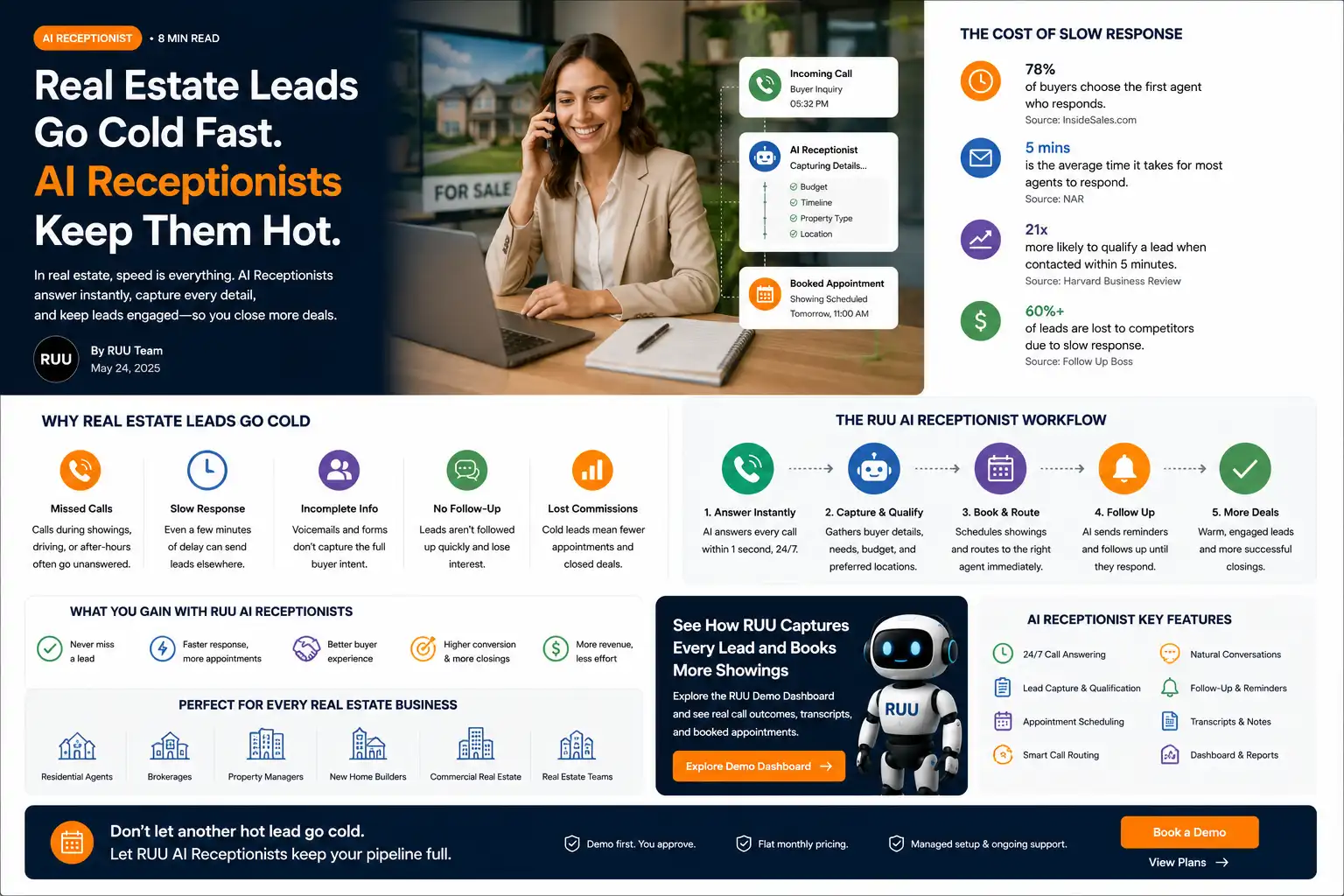
Why real estate leads go cold fast
A real estate lead is often created at the exact moment a person is actively comparing options. A buyer sees a listing and wants to know if it is still available. A seller wonders what their home could be worth. A renter asks about a showing. An investor wants basic property details before moving on.
That intent is valuable because it is specific and time-sensitive. The person is not browsing a generic brochure. They are asking about a property, a neighborhood, a timeline, a price range, or a next step. When no one answers quickly, the lead does not always wait. They may submit another form, call another number, message another agent, or simply lose momentum.
The National Association of REALTORS® reported in its 2025 Profile of Home Buyers and Sellers that 88% of recent home buyers purchased through a real estate agent or broker, and buyers primarily sought help finding the right home to purchase. In a market where buyers still rely heavily on agents, responsiveness and useful follow-up remain part of the client experience.
Real estate leads go cold when the business fails to capture intent while the buyer or seller is actively engaged. A better workflow answers quickly, records the request, captures buyer or seller details, routes the lead to the right person, and makes the next action visible.
Where real estate follow-up usually breaks
Most agents and brokerages do not lose leads because they do not care. They lose leads because real estate work is fragmented by nature. Agents are in showings, driving between appointments, handling negotiations, speaking with lenders, hosting open houses, or dealing with existing clients.
That makes lead response uneven. One inquiry is answered immediately. Another goes to voicemail. A third arrives through a portal, a fourth through a website form, and a fifth through a yard sign. Unless the workflow captures and routes each request consistently, the team may not know which lead needs action first.
- A buyer asks about a specific listing, but the property interest is not logged.
- A seller requests a valuation, but their timeline and address are missing.
- A showing request arrives after hours and waits until morning.
- An open-house visitor asks for follow-up, but the next action stays in someone’s notes.
- A lead is assigned to one person while another teammate could have responded sooner.
InsideSales research on lead response has long emphasized how quickly conversion opportunity can drop after the first few minutes. The exact lift varies by business type and lead quality, but the operational lesson is stable: speed matters most when it is paired with a usable follow-up record.
Explore sample call logs, transcripts, showing-request cards, routing notes, and next-action fields before activating live AI call handling.
Buyer and seller examples
Real estate lead capture is not one generic script. A buyer inquiry and a seller inquiry need different fields, different routing, and different follow-up expectations.
Buyer inquiry workflow
A buyer may ask about a listing, showing availability, school district, price, taxes, HOA details, financing stage, or nearby options. Even if the AI receptionist cannot answer every property-specific question, it can collect the essentials and route the request properly.
- Which property or neighborhood they are asking about
- Budget or price range
- Buying timeline
- Pre-approval or financing status, if relevant
- Preferred showing time
- Best callback method
Seller inquiry workflow
A seller lead may need a different path: address, timeline, reason for selling, whether they are also buying, current occupancy, desired price range, and whether they want a valuation appointment. Missing those details can force the agent to restart the conversation later.
What a better real estate lead workflow should capture
The goal is not to make the AI receptionist “close” the client. The goal is to preserve the lead’s context while the intent is fresh and give the human team a cleaner handoff.
Useful fields to capture
- Lead name, phone number, email, and preferred contact method
- Buyer, seller, renter, investor, or agent referral intent
- Property address, listing link, or neighborhood interest
- Budget, price range, or estimated home value range
- Timeline and urgency
- Showing request or consultation request
- Lead source, such as website, portal, sign call, ad, or open house
- Transcript, recording, outcome status, and next action
- Human handoff flag for sensitive or high-value conversations
Those fields turn a scattered inquiry into a reviewable business outcome. A manager can see which leads arrived, what they wanted, who should follow up, and whether the next action was completed.
Where RUU fits
RUU is a managed AI voice system for teams that need calls handled, logged, and reviewed. For real estate teams, RUU can support AI Receptionist workflows for inbound buyer and seller inquiries and AI Calling Agent workflows for structured follow-up.
RUU can help answer repeatable questions, collect lead details, route showing requests, identify urgency, save recordings and transcripts, and create dashboard-visible outcomes. It is not a replacement for licensed human judgment, client advice, negotiation, legal interpretation, financing guidance, or sensitive seller conversations.
That boundary matters. A useful AI voice workflow should know when to collect information and when to hand off. Examples that should be routed to a person include offer strategy, legal questions, distressed sale situations, financing concerns, fair-housing-sensitive requests, commission discussions, and high-value client conversations.
What to review inside the demo dashboard
Before activating live real estate call handling, use the RUU demo dashboard to review how sample buyer and seller inquiries become structured outcomes. Look for call logs, transcript previews, recording cards, lead source, property interest, urgency, assigned next action, and handoff reason.
Live AI call handling begins only after plan selection, verification, workflow setup, and production approval. Real estate teams should also review brokerage rules, escalation policies, lead ownership rules, and any local communication requirements before going live.
Sources and research notes
These sources are included as directional context, not as guaranteed RUU performance claims:
- National Association of REALTORS® 2025 Profile of Home Buyers and Sellers: buyer and seller market context, including agent use and home-search behavior.
- InsideSales lead-response research: directional context on how quickly conversion opportunity changes after an inbound inquiry.
- Harvard Business Review, The Short Life of Online Sales Leads: historical context on online inquiry response speed and lead handling.
- NAR 2025 report highlights PDF: market context on inventory, affordability, buyer search duration, and agent reliance.