
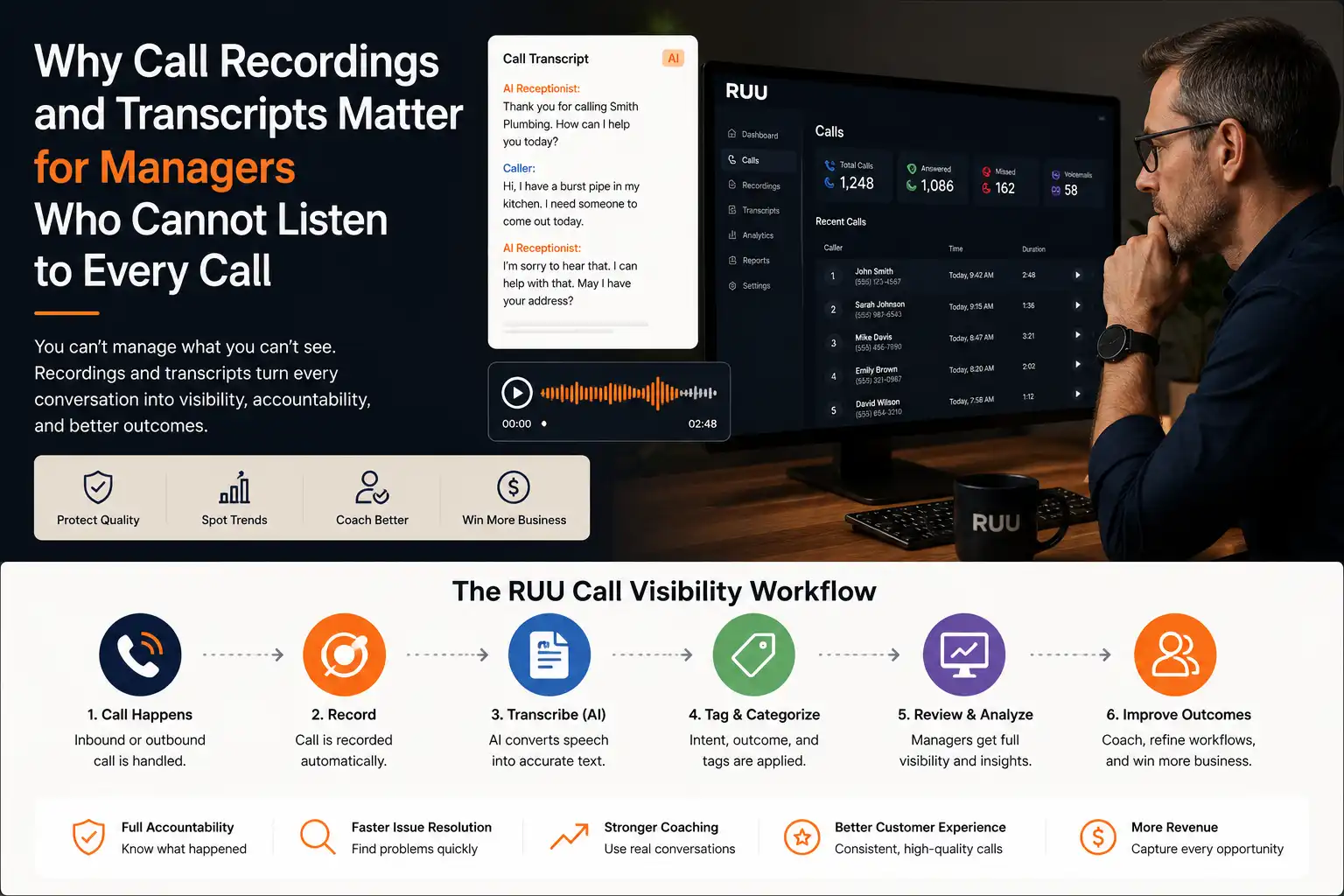
Why call visibility matters
Business calls are often where the real customer story appears. A caller explains urgency. A prospect asks a buying question. A patient requests an appointment. A homeowner describes a job. A guest changes a booking. A customer complains about an order. Those details may never appear clearly in a form field or inbox.
The problem is that most managers cannot listen to every conversation as it happens. They may see call volume, missed calls, or team activity, but not the actual quality of the conversation. That creates a gap between what the business thinks happened and what the caller actually experienced.
Call recordings and transcripts close part of that gap. They give managers a way to review the facts after the call: what the caller wanted, how the team or AI responded, whether the next action was clear, and whether the outcome was logged properly.
Call recordings and transcripts matter because they turn phone conversations into reviewable business evidence. They help managers verify caller intent, follow-up needs, service quality, coaching opportunities, and outcome accuracy without listening to every call live.
What call recordings show that notes often miss
A note can tell a manager that a customer “wanted pricing.” A recording can reveal whether the caller sounded urgent, confused, annoyed, ready to book, or hesitant because the response was unclear. That difference matters when the team is trying to improve call handling.
Recordings are especially useful when a call contains tone, hesitation, interruptions, objections, or a dispute about what was promised. A transcript can summarize the content, but the audio still helps managers understand how the conversation felt from the caller’s side.
- Was the caller’s problem understood quickly?
- Did the team ask the right qualifying questions?
- Was the handoff or next step explained clearly?
- Was urgency recognized or missed?
- Did the caller leave with confidence or confusion?
What transcripts change for busy managers
Recordings are useful, but they are slow to review one by one. Transcripts make call visibility searchable and scannable. A manager can look for common reasons people call, recurring objections, incomplete handoffs, missed booking intent, or phrases that signal dissatisfaction.
This is where transcripts become more than documentation. They become an operating layer. Instead of asking the team what happened, managers can review the conversation, search the language, compare outcomes, and identify where the workflow needs improvement.
Explore sample recordings, transcripts, summaries, and outcome cards inside the RUU demo dashboard.
Where call review usually breaks
Most teams do not avoid call review because they do not care. They avoid it because the workflow is heavy. Calls are spread across phones, personal devices, call center tools, receptionist notes, voicemail inboxes, CRM entries, and team chat. Even when recordings exist, they may not be tied to a clear outcome.
The real issue is not recording alone. It is whether the recording is connected to enough context for a manager to act on it.
- The recording exists, but no one knows which calls are important.
- The transcript exists, but no outcome status is attached.
- The team writes notes, but the original conversation is not easy to verify.
- The manager sees call volume, but not caller intent or service quality.
- Coaching happens from memory instead of real call examples.
What managers should capture from every important call
A useful call record should make the conversation easy to review. It should not force a manager to hunt through disconnected systems to understand what happened.
| Field | Why it matters | What it helps managers do |
|---|---|---|
| Recording | Preserves tone, context, objections, and commitments. | Verify what happened and coach from real examples. |
| Transcript | Makes the call searchable and easier to scan. | Find repeated issues, keywords, and service gaps. |
| Caller intent | Shows why the person called. | Separate sales, service, support, appointment, and urgent requests. |
| Outcome status | Shows what happened after the conversation. | Review booked, unresolved, callback needed, or handoff required calls. |
| Next action | Connects the conversation to work. | Make follow-up visible instead of relying on memory. |
How recordings and transcripts improve coaching
Good coaching is specific. “Answer faster” or “be better on the phone” is too vague. A recording gives the manager a real moment to discuss. A transcript gives the manager a searchable version of the same conversation. Together, they make coaching less personal and more operational.
For example, a manager can show where a caller asked for pricing and the team skipped a qualifying question. Or where a caller sounded ready to book, but the next step was not confirmed. Or where a handoff was needed but the call ended without a clear callback owner.
This matters for AI voice workflows as well. Managers need to review whether the workflow captured the right intent, gave the right boundary, routed the right next step, and handed off when a human should take over.
Where RUU fits
RUU is designed as a managed AI voice system for businesses that need calls handled, logged, followed up, and reviewed. For call visibility, the value is not only that a call is answered or placed. The value is that the call becomes a dashboard-visible outcome.
In a RUU workflow, a call can be connected to a transcript, recording, detected intent, summary, outcome status, and next action. That gives managers a clearer way to review what happened without listening to every call live.
RUU is not meant to remove human judgment. Sensitive, complex, urgent, or policy-specific conversations should have a handoff path. The goal is to make calls visible enough that teams can manage the workflow instead of guessing from incomplete notes.
What to review inside the demo dashboard
Before activating live AI call handling, use the RUU demo dashboard to review how call visibility works. Look at sample call logs, transcript previews, recording cards, intent labels, outcome statuses, and next-action examples.
Live AI call handling begins only after plan selection, verification, workflow setup, and production approval. That gives your team a safer way to understand how calls become reviewable before connecting real customer conversations.
Sources and research notes
These sources are used as directional context, not as guaranteed outcome claims for RUU. Actual results depend on call volume, workflow design, team process, industry, offer quality, and implementation.
- Invoca Call Conversion Industry Benchmarks Report 2025: useful context that phone calls remain a major conversion and review point across high-intent industries.
- Invoca / PRNewswire 2025 methodology note: notes that the benchmark report analyzed anonymized contact center data from more than 60 million phone calls.
- Salesforce State of Service report: useful context on rising AI use in service workflows and the growing role of AI-assisted case handling.
- CMSWire contact center QA best practices 2025: useful context on quality assurance as a way to evaluate accuracy, empathy, and efficiency in customer interactions.